Everything your team needs on WhatsApp
Channels, inbox, automation, marketing, sales, store, Google apps, AI and an API, in one panel. Your plan decides which parts are switched on and how much of each you get.
Channels
Customers reach you where they already are. Every message lands in the same inbox.
- Official WhatsApp Business API
Connect your number through Meta’s own sign-up window. Add more numbers as you grow, and see each one’s quality rating and daily limit.
- Instagram DMs
Reply to Instagram messages from the inbox, turn comments on your posts into DMs, and answer story mentions.
- Website live chat
A chat window on your website where visitors can type, send voice messages or call you, answered from the same inbox.
- WhatsApp calls
Customers can call your WhatsApp number. Calls ring your team in the browser and the app, with IVR menus, hold music, transfers, voicemail and recording.
- Chat links and QR codes
Short links and designed QR codes that open a WhatsApp chat with a ready message, with scan and click counts.
- Website chat button
A WhatsApp or Instagram button for your site with a greeting, opening hours and its own stats. One line of code to install.
Team inbox
One shared inbox for the whole team, live for everyone, on desktop and phone.
- Shared, live inbox
New messages, read ticks and assignments appear for everyone at once. Open, pending and resolved views keep the queue clear.
- Automatic chat routing
Share new chats between the people who are online, cap how many each person takes, and send each channel or number to the right team.
- Rich replies
Send text, photos, video, documents and voice notes recorded in the browser. Quote a message, use /quick replies, or pick an approved template.
- Private notes
Leave notes for colleagues inside the chat. Customers never see them.
- The whole customer beside the chat
Tags, custom fields, leads, tickets, orders and past conversations in one side panel, with a full customer page one click away.
- Phone app and notifications
Install the inbox as an app on Android or any phone, with push notifications for the chats you own.
Automation and flows
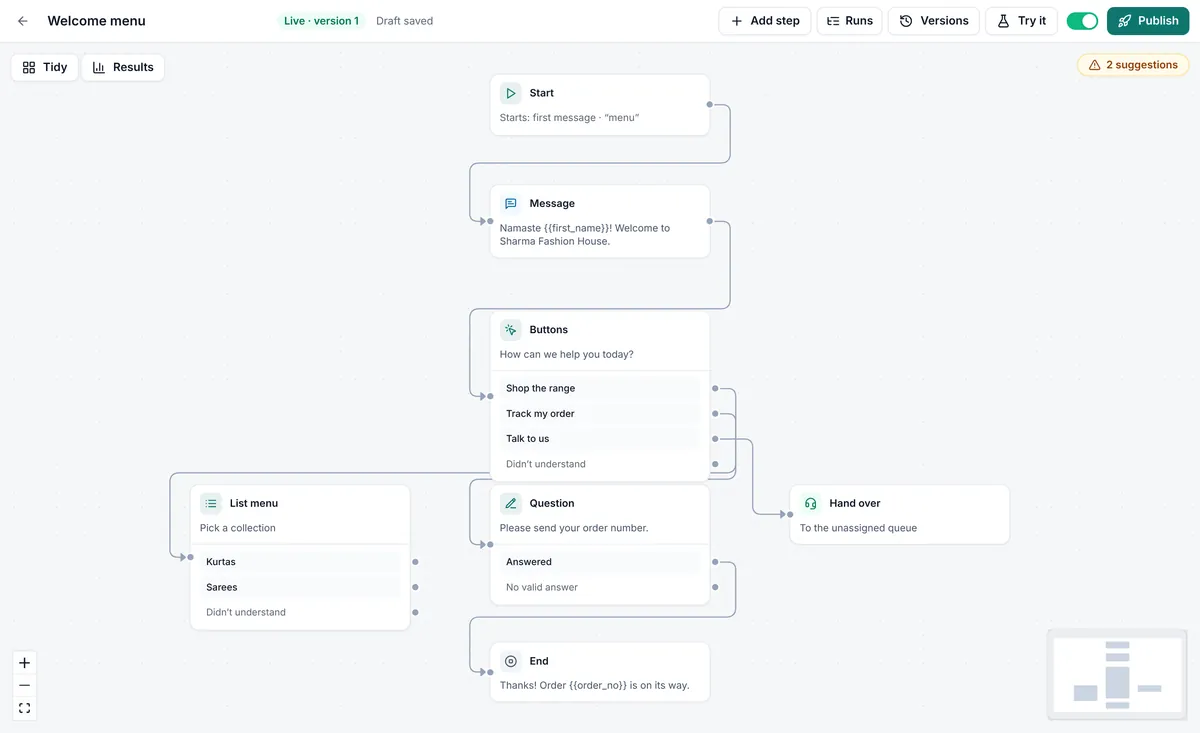
Build chatbots and automations by dragging steps, test them, then switch them on.
- Flow builder
Messages, reply buttons, lists, questions that save answers, conditions, delays and hand-over to a person, on one canvas.
- Start on anything
A keyword, a first message, a template button tap, or an event: a new lead, a won deal, an order placed or shipped, a missed booking, a solved ticket, a failed payment, or a date and time.
- Reminders when nobody replies
Nudge customers who stop answering, then follow a “no reply” path or close politely, all inside WhatsApp’s 24-hour window.
- Call your own systems
Send data to your server mid-flow and branch on what it returns.
- Auto-replies and business hours
Welcome, away and keyword replies, with business hours in your time zone and a cool-down so customers aren’t spammed.
- Runs you can inspect
Every run is recorded step by step. Start from a ready-made chatbot template if you prefer.
Marketing
Reach thousands of customers with messages they asked for, and see what worked.
- Broadcast campaigns
Send an approved template to everyone with chosen tags, with each variable filled from the contact. Send now or schedule.
- Cost before you send
See the recipients, the opted-out contacts left out, and the exact price per country before you launch.
- Template manager
Write marketing, utility and authentication templates with media headers and buttons, check them against Meta’s rules, and submit for approval.
- Contacts at scale
Import thousands of contacts from CSV with tags and custom fields, and export them whenever you like.
- Opt-outs handled
A customer who replies STOP is never sent marketing again. START brings them back.
- Landing pages and forms
Build pages with a drag-and-drop editor, and forms that save answers to your contacts and leads.
Sales and support
Turn conversations into deals, and problems into solved tickets.
- Lead pipeline
Leads on a board by stage, with value, owner, priority, follow-up tasks and the chat that started them. Leads from ads, chats and forms are captured on their own.
- Quotations
Send a quotation as a PDF on WhatsApp or email straight from the lead.
- Tickets
Track issues from any chat to the end, with reply targets, overdue alerts, a status page for the customer and a rating when it’s solved.
- Help centre
Publish answers to common questions on your own help pages. The AI assistant can use them too.
- CRM reports
Response times, chats per person, lead conversion and ticket performance, by team and by channel.
Store, bookings and payments
Sell, take bookings and collect money without leaving WhatsApp.
- WhatsApp Store
A store website and WhatsApp catalog with carts, orders, payments and reminders for abandoned carts.
- Bookings
A booking page for your services, with staff calendars, reminders before the appointment and a feedback request after.
- Payment links
Collect payments online with your own Razorpay or Cashfree account, and see who paid right in the chat.
- Subscriptions
Recurring plans for your customers with automatic invoices, payment reminders, trials and win-back messages.
Google apps
Connect a Google account once and your work flows into the tools you already use.
- Google Sheets
New leads, orders, form answers and bookings are added to a sheet as they happen. Flows can add rows too.
- Google Calendar and Meet
Bookings and tasks go to your team’s calendars, busy times can’t be booked, and video appointments get a Meet link.
- Google Contacts
Copy customers to Google Contacts so your phones show their names, or import from Google.
- Google Business Profile
See and reply to Google reviews, get told about low ratings, and send a “Review us” link on WhatsApp.
- Google Drive
Save call recordings, voicemails, invoices, quotations and form uploads to a Drive folder.
- Gmail
Send ticket updates, quotations and invoices from your own Gmail address.
AI
Use your own OpenAI, Google Gemini or Anthropic key. You stay in control of cost and data.
- AI assistant on chat
Answers customers on WhatsApp and Instagram from your business details, FAQs and help centre, and hands over to a person when asked or unsure.
- AI voice calls
Website visitors can talk to your assistant by voice. It can answer WhatsApp calls, or call customers to confirm, remind or follow up, and record the outcome.
- Help for your team
Summarise a chat, suggest or rewrite a reply, pull details into the contact, draft a ticket answer or a help article.
- AI in flows
Flow steps that answer free-text questions, sort what a customer meant, pull out details, summarise or translate, then carry on.
- Call transcripts and summaries
AI calls are transcribed in English, Hindi or Hinglish and summarised for whoever picks up next.
Developers
Everything the panel does is available to your own systems.
- REST API
Send templates, text, media, buttons and lists; read conversations; manage contacts. Idempotency keys stop double sends.
- Signed webhooks
Messages, delivery status and campaign events pushed to your server, signed so you can trust them.
- Docs with a Try it console
Searchable API docs on your panel’s own address, an OpenAPI file and verification samples for Node.js, PHP and Python.
- n8n nodes
Trigger n8n workflows on new messages and send replies without writing code.
Security and control
Built for teams that handle customer data every day.
- Roles and permissions
Owner, admin, manager and agent roles, or your own. Agents only see the chats that are theirs to answer.
- Two-factor sign-in
Authenticator-app codes with backup codes, and owners can require it for the whole team.
- Audit log
Who changed what and when, for every important action.
- Account access on your terms
Support can only open your account after you approve, for a set time, and view-only if you prefer.
- Backups and private files
Nightly backups, files kept private and checked on every download, and secrets stored encrypted.
Billing in rupees
Clear, prepaid and GST-ready.
- Prepaid wallet
Recharge by UPI or bank transfer. Only delivered messages are charged, by category and the customer’s country.
- GST invoices
An invoice for every plan payment and every recharge, with your GSTIN.
- Monthly or yearly plans
Free trial on most plans, add-ons when you need a little more, and upgrades at any time.
- Usage you can check
Spend by day, campaign and source, a full message log, and a low-balance alert before anything stops.
See it with your own number
Start a free trial, or ask us to walk you through the parts your business needs.